

Cowboy Add Your Own Face Craft, Wild West Activity, Printable Body Templates, Bulletin Board Activity, Coloring Version Included, Light Dark Skin Inclusive Designs, PDF PNG Transparent Files
Cowboy Add Your Own Face Craft, Wild West Activity, Printable Body Templates, Bulletin Board Activity, Coloring Version Included, Light Dark Skin Inclusive Designs, PDF PNG Transparent Files
Couldn't load pickup availability
Create meaningful classroom engagement with this Cowboy Add Your Own Face Craft, Wild West Activity, Printable Body Templates. Students add their own photo to build a personalized cowboy character that supports imaginative storytelling and visual learning. With Light & Dark Skin options, this resource supports inclusive representation and helps children connect with their creations. It is suitable for classroom instruction, homeschool activities, group projects, bulletin boards, party stations, dramatic play corners, and themed learning units.
This resource includes 10 Unique Designs, PDF + PNG with Transparent Background, Coloring Version Included in High Resolution 300 DPI. You will receive US Letter (8.5" × 11") and A4 formats, designed for flexible printing at home or school. PNG transparent files allow easy customization in Canva, while coloring pages provide additional classroom engagement. It supports literacy centers, art integration, morning work, early finisher tubs, indoor recess, creative writing prompts, and seasonal western-themed activities.
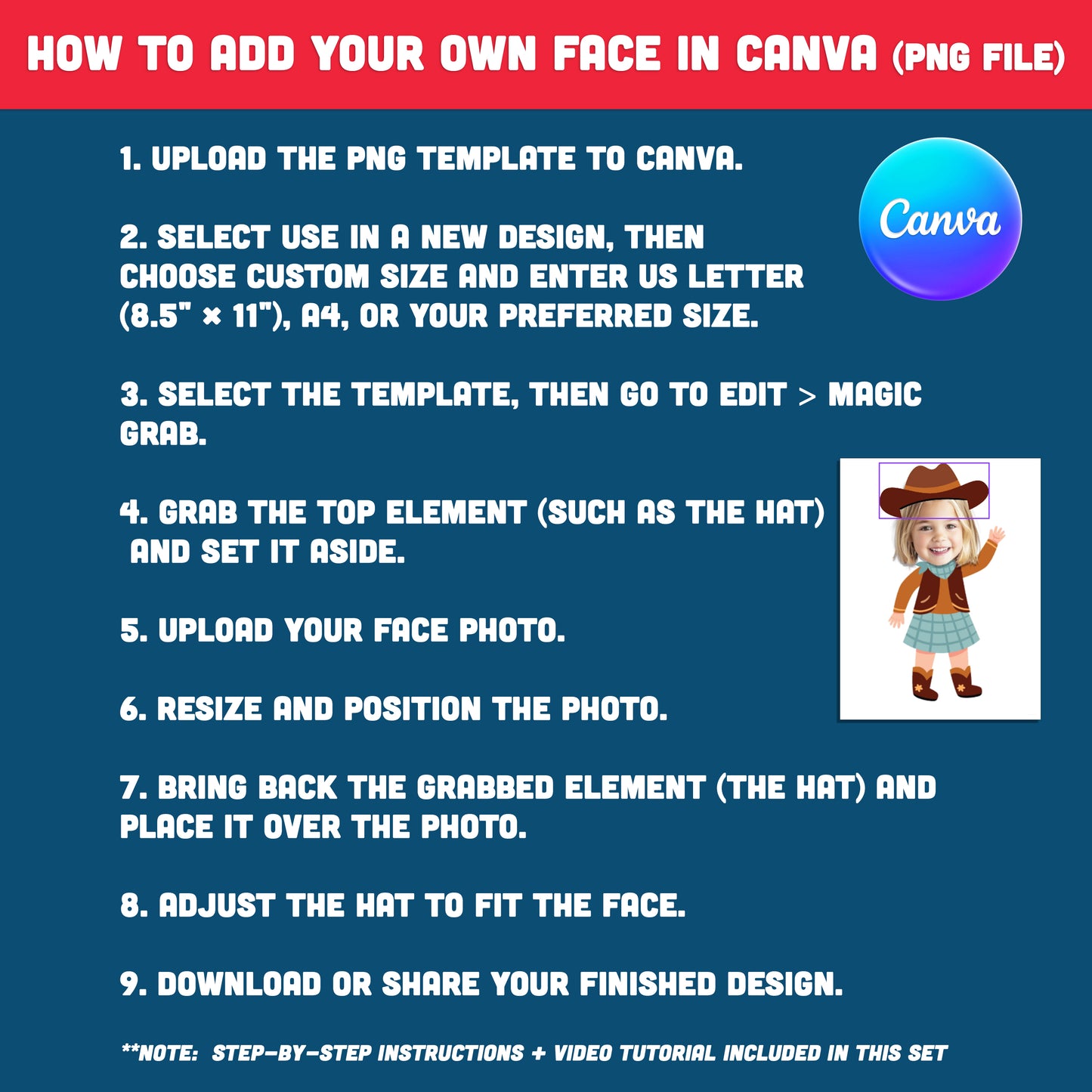
You will also receive How to Add Your Own Face in Canva (Using PNG File and Magic Grab) plus a Video Tutorial and Step-by-Step Instructions. The guide is designed for easy use even for beginners with no design experience. Download instantly to create personalized cowboy crafts for classroom displays, keepsake projects, or engaging learning activities.
• Instructions for PDF
1. Open PDF – Open the file in a PDF reader.
2. Print – Print the body template on US Letter (8.5" × 11") or A4 paper.
3. Cut & Add Face – Cut out the body and glue your face photo.
• Instruction: How to Add Your Own Face in Canva (Quick Summary)
1. Upload the PNG template to Canva.
2. Select Use in a New Design, then choose Custom Size and enter US Letter (8.5" × 11"), A4, or your preferred size.
3. Select the template, then go to Edit > Magic Grab.
4. Grab the top element (such as the hat) and set it aside.
5. Upload your face photo.
6. Resize and position the photo.
7. Bring back the grabbed element (the hat) and place it over the photo.
8. Adjust the hat to fit the face.
9. Download or share your finished design.
. . . . . . . . . . . . . .
WHAT YOU WILL RECEIVE
• You’ll receive a ZIP file including 10 Light Skin PDFs + 10 PNGs, 10 Dark Skin PDFs + 10 PNGs, and 10 Coloring Pages, all in 300 DPI and ready to use. The set also includes a How to Add Your Own Face in Canva (Using PNG File & Magic Grab) guide and a video tutorial, making it easy to customize even with no design experience.
• Digital download only. No physical product will be shipped.
• Print at home or at your local print shop.
• Includes US Letter (8.5" × 11") and A4 print sizes. For best results, print on cardstock.
. . . . . . . . . . . . . .
JUST DOWNLOAD, PRINT, AND GET STARTED
* This item comes as a high-resolution file that you can download straight after purchasing.
* You can print as many copies as you want.
. . . . . . . . . . . . . .
NOTE
* This is a digital item.
* No physical product or printed material will be shipped.
* Following payment, you'll receive a download link where you can download the digital files for this product instantly.
* No refunds as this is a digital product.
. . . . . . . . . . . . . .
TERMS OF USE
» Personal Use. You may print the files as many times as you like for your own personal use.
» Reselling or sharing is not allowed.
» All sales are final due to the nature of digital products.
» Copyright © Little Melon Press. Copyright does not transfer with sale.
Share